Par POS Users,
We are excited to announce that catering is coming to the A&W system.
Below are the steps for pricing your catering items.
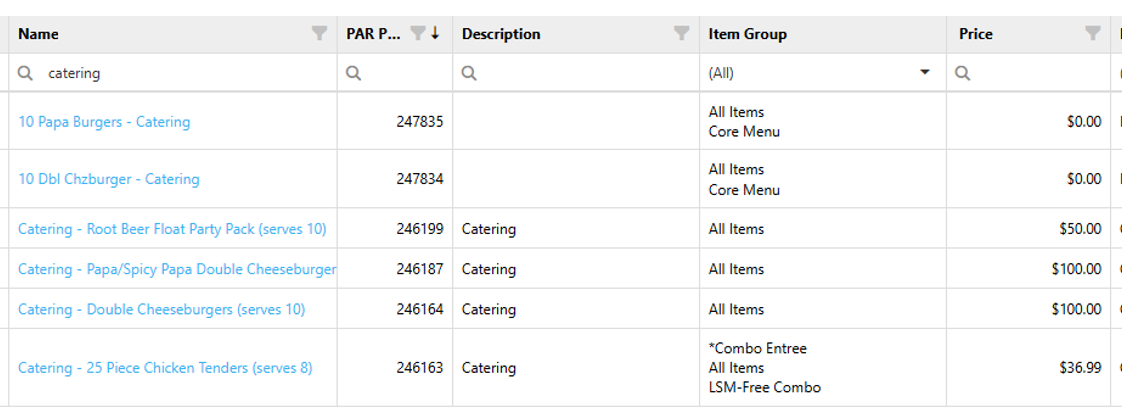
- Log into PAR POS
- Navigate to Settings Editor
- Locate “Items”.
- Search for “Catering”
- Price the items that show catering in the description.
- Publish the changes.
Catering also offers the option to add on a gallon of Root Beer/Zero Sugar Root Beer. To price the beverage, you would follow the same steps as pricing a "customize your combo" item.
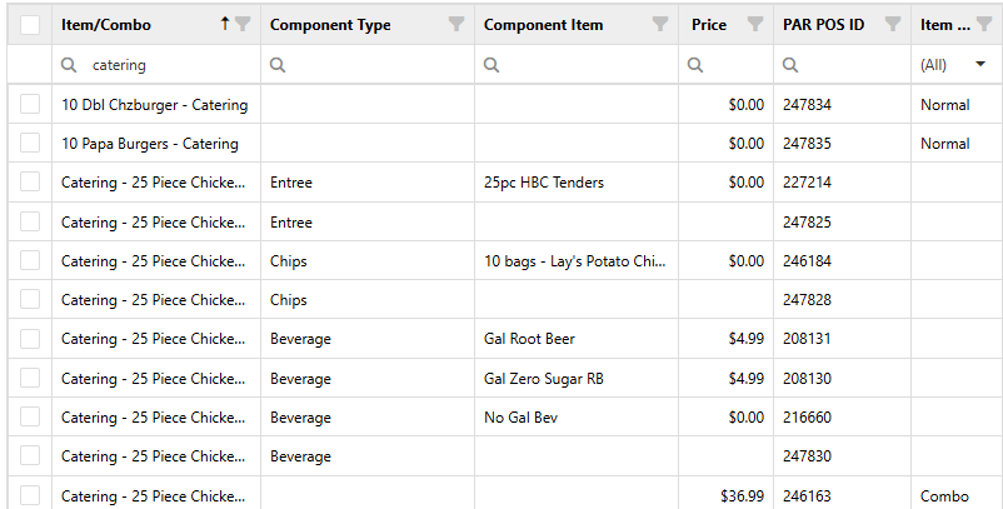
- Log into PAR POS
- Navigate to Settings Editor
- Navigate to “Item Bulk Price Update”
- Search for “Catering”
- Find the component type.
- Next to Beverage, price the amount to add on a gallon beverage.
- Be sure to price each catering item component
· Catering – 25 Piece Chicken
· Catering Double Cheeseburgers
· Catering – Papa/Spicy Double Cheeseburgers
14. Publish the changes.
Please reach out to POS Admin via QR code with any questions, and we will assist.
Was this article helpful?
That’s Great!
Thank you for your feedback
Sorry! We couldn't be helpful
Thank you for your feedback
Feedback sent
We appreciate your effort and will try to fix the article